Practical answer
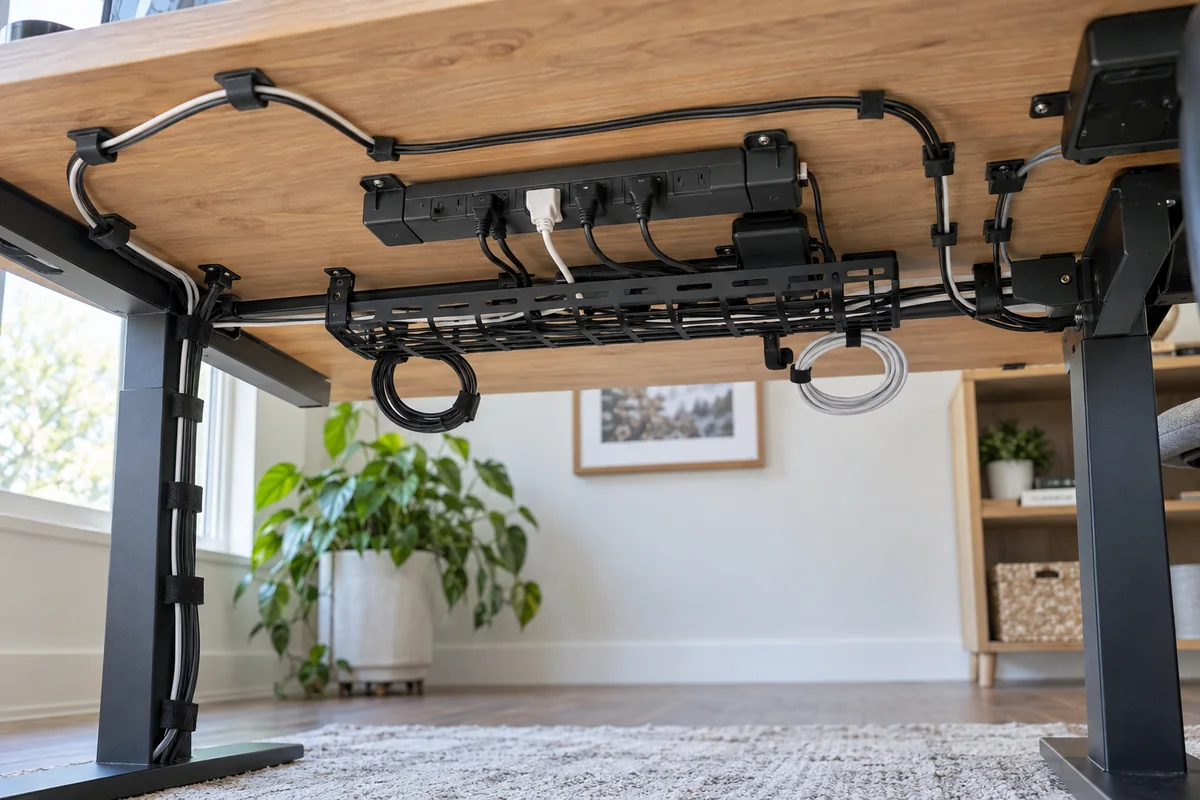
A useful desk cable system supports the power strip and adapters, routes one main trunk, preserves movement at the desk and monitor, and remains easy to service. Buying a box of clips before deciding where power lives usually produces a tidy-looking but fragile route.
Choose the mounting method from the desk construction and total load. Clamp-on trays are reversible, desk-specific brackets offer known compatibility, and screw-mounted baskets can be secure and accessible when drilling is acceptable.
- Place power before routing signal cables
- Count adapters as well as cords
- Keep outlets and indicators accessible
- Test full sit-stand travel and one-device removal
Build four layers instead of one bundle
| Layer | Job | Useful hardware |
|---|---|---|
| Power zone | Support the strip and heavy adapters | Rated tray or basket with ventilation and access |
| Main trunk | Carry the combined route along the desk | Sleeve, reusable ties or supported raceway |
| Movement points | Allow desk and arm travel without pulling connectors | Measured service loops and strain relief |
| Device branches | Separate the last short run to each device | Light clips, labels and reusable ties |
Inventory before buying organizers
- List every powered device, adapter, data cable and removable charging lead. Remove abandoned hardware.
- Choose an accessible power-strip location with enough space for the largest adapters and switches.
- Weigh or estimate the complete supported load, then compare it with the tray rating and desk attachment method.
- Route power and data according to device instructions, avoiding sharp bends, pinch points and hot equipment.
- Move the desk and monitor arms through their full range while watching every connector.
- Unplug one device without cutting ties or dismantling the route; improve access if this maintenance test fails.
Installation method is the main product difference
A generic clamp-on tray can suit renters, but it needs a square, unobstructed edge within the published thickness range. A proprietary bracket may be simpler on the matching desk and useless elsewhere. A screw-mounted fabric basket preserves the desk edge and folds down for access, but creates permanent holes.
Check internal tray height and cable openings against the actual power strip, side-facing plugs and adapters. Exterior width alone does not show whether the loaded strip will lie flat.
Separate fixed charging from portable cables
Keep one fixed charging zone at the desk for devices that live there. Label both ends when similar USB-C cables have different data or power capability, and keep temporary phone or headset leads reachable without opening the main tray.
A travel charger and its verified cables should stay together as a kit rather than being borrowed from the desk every day. Retire damaged, unidentified or obsolete cables through an appropriate electronics program instead of storing them indefinitely.
- Use labels that identify the device or capability, not only the connector shape.
- Photograph the completed route before closing a tray or sleeve.
- Keep power bricks ventilated and protection indicators visible.
- Review the route after adding or removing equipment instead of layering another bundle on top.
Published-spec examples for different constraints
These examples are not universal rankings. Each one remains on the shortlist because its published design fits a different workspace constraint. No affiliate relationship influenced inclusion.
| Model | Useful for | Published highlights | Verify before buying |
|---|---|---|---|
| FORSASONG Cable Management Tray IKEA | Renters or desks that should not be drilled | Clamps to published 5/8-1 5/8-inch surface thicknesses; 15-inch width | Curved or obstructed edges can prevent clamping |
| Cable Management Tray Vari | Compatible Vari electric standing desks | Published 21.5-inch overall length; Rotating metal mounting brackets | Not a universal tray |
| NeatTech Humanscale | Sit-stand desks needing a supported under-desk bundle | Fold-down access design; Internal straps | Installation uses four screws |
FORSASONG Cable Management Tray
Best suited to: Renters or desks that should not be drilled; Light cable and small power-strip loads.
A reversible clamp-on tray for desks with a compatible square edge. Manufacturer documentation highlights clamps to published 5/8-1 5/8-inch surface thicknesses, 15-inch width, published 7 lb maximum load.
Potential strengths
- No drilling in a compatible surface
- Can be repositioned
- Load and clamp range are published
Points to verify
- Curved or obstructed edges can prevent clamping
- Tray openings and depth may not fit every power strip or adapter
Cable Management Tray
Best suited to: Compatible Vari electric standing desks; Setups that need the power strip to rise with the desktop.
A desk-specific tray that travels with compatible Vari standing desks. Manufacturer documentation highlights published 21.5-inch overall length, rotating metal mounting brackets, cable openings at both ends.
Potential strengths
- Designed around named desk models
- Moves with the desktop
- Official compatibility list is available
Points to verify
- Not a universal tray
- Compatibility must be checked by exact Vari desk line
NeatTech
Best suited to: Sit-stand desks needing a supported under-desk bundle; Setups that are changed or serviced frequently.
A fold-down under-desk basket for buyers who value access after installation. Manufacturer documentation highlights fold-down access design, internal straps, multiple published size and material options.
Potential strengths
- Serviceable without removing the full basket
- Travels with a height-adjustable desk
- Cable pass-through is built into the design
Points to verify
- Installation uses four screws
- Premium positioning and size selection require planning
Questions people ask
Should the power strip go on the floor or under the desk?
Under-desk mounting can reduce moving cable length and floor clutter, especially on a standing desk, but only when the strip manufacturer permits the orientation and the mount safely supports the full load.
Are cable sleeves enough?
Sleeves organize a trunk but do not support a power strip or adapters. Use them after the heavy components have a secure, ventilated location.
How do I keep a standing-desk cable from pulling?
Put the power zone on the moving desktop when appropriate, then leave one planned vertical service loop to the wall outlet. Test at full height and watch for frame pinch points.
Sources and methodology
These sources support the setup logic and boundaries above. Check product-specific instructions before making a purchase or changing electrical equipment.
- FORSASONG Cable Management Tray — IKEA ↗Official clamp range, dimensions, load and installation information.
- Cable Management Tray — Vari ↗Official desk compatibility and routing design.
- NeatTech — Humanscale ↗Official fold-down, sit-stand and installation information.
- Safety at Home: Extension Cords — U.S. Consumer Product Safety Commission ↗Consumer guidance on damage, routing and overload.