Practical answer
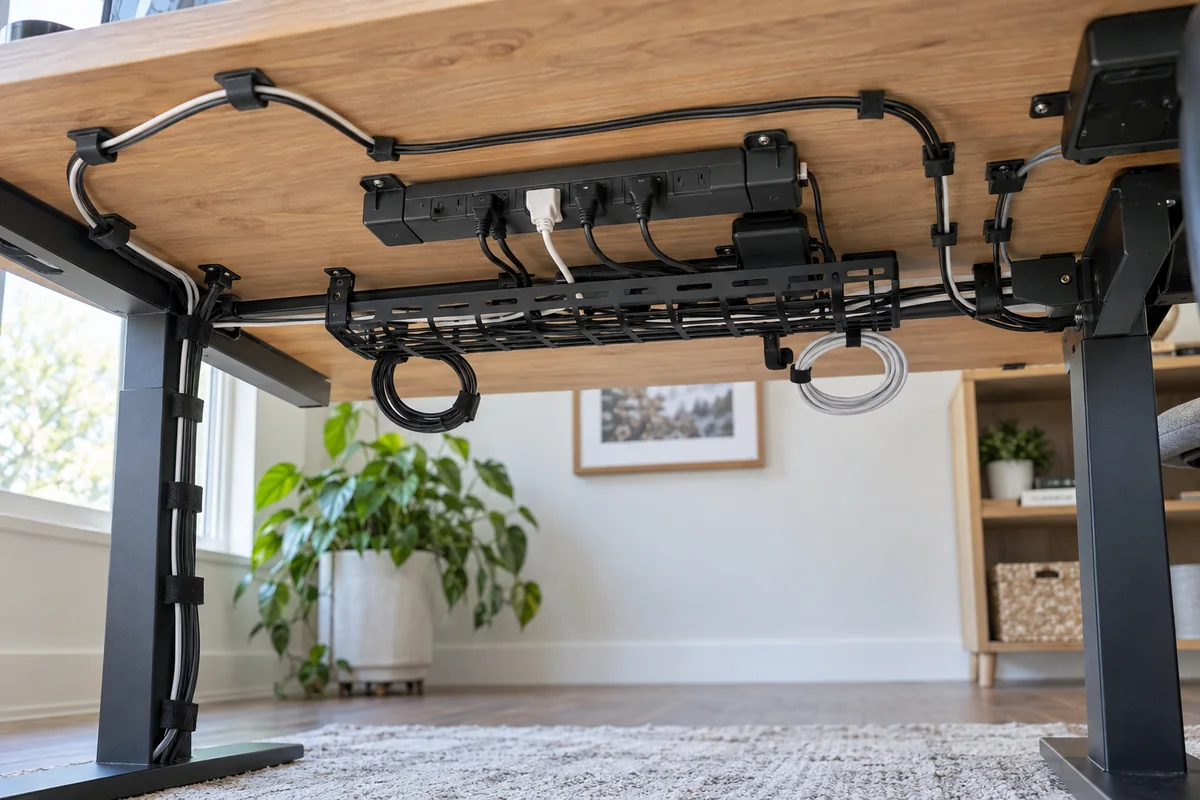
For a no-drill desk, choose the mounting method from the load and surface—not from how invisible it looks in a product photo. Clamp-on hardware is usually the most reversible choice for a heavy power strip and bricks; adhesive clips are better for light branch cables on a compatible surface.
“No drilling” does not mean “no damage.” Adhesive can fail or affect a finish, clamps need a compatible edge, magnets require suitable steel, and freestanding boxes consume floor or desktop space.
- Weigh the complete load
- Check edge and frame clearance
- Treat adhesives as light-duty unless the exact product says otherwise
- Leave a service loop for movement and repairs
Match the mounting method to the job
| Method | Best use | Verify first | Main limitation |
|---|---|---|---|
| Clamp-on tray or basket | Power strip, adapters and the main cable trunk | Desktop thickness, rear frame/apron, clamp footprint and total load | Visible clamp and required desk-edge access |
| Adhesive clips or raceway | Light branch cables on a smooth compatible surface | Surface type, cleaning method, cure/wait time and stated weight limit | Heat, dust, texture and downward peel can reduce hold |
| Magnetic clips or tray | Steel frames and legs | Actual magnetic surface and pull direction | Not useful on wood, aluminum or nonmagnetic finishes |
| Freestanding cable box | Power strip kept off the desk without mounting | Ventilation, plug size, floor access and trip path | Consumes space and does not control every branch cable |
| Hook-and-loop straps | Bundling and service loops | Bundle diameter and bend radius | Organizes cables but does not support a heavy power strip |
Build the route from the outlet to the device
- Photograph the current setup and label both ends of cables that are hard to identify.
- Separate fixed infrastructure from temporary charging leads. Remove abandoned cables and power adapters before buying organizers.
- Choose the power-strip position first. Keep plugs, switches and protection indicators accessible, and follow the strip manufacturer’s ventilation and placement instructions.
- Create one supported trunk from the power area toward the devices. Add light clips only for the final short branches.
- Leave service loops at moving monitor arms and across the full travel of a sit-stand desk. Test the lowest and highest position before tightening bundles.
- Unplug one device as a maintenance test. If that requires cutting every tie or removing the tray, the system is too difficult to service.
Use adhesive products only as their instructions allow
Adhesive performance depends on the exact product, orientation, surface and preparation. Command states that its products work best on clean, dry, smooth approved surfaces and that users must follow the package weight and waiting-time instructions. It also warns against several rough or delicate surfaces.
Those instructions do not automatically approve a wall-hanging strip for suspending a heavy power strip upside down beneath a desk. Use a product specifically documented for the object, surface and mounting orientation; otherwise choose a clamp or freestanding method.
Questions people ask
Are adhesive cable trays safe under a desk?
Only when the exact tray and adhesive are rated for the total load, surface and orientation. Power bricks create concentrated weight and heat; a clamp-on tray is often easier to inspect and reposition.
How do I manage cables on a glass desk?
Avoid assuming an adhesive or clamp is glass-safe. Check the desk maker’s restrictions, edge construction and load limits. A freestanding box plus light, approved surface clips may be the lower-risk approach.
How much slack does a standing desk need?
Enough for every cable to reach the highest position without tension and the lowest position without snagging. Test full travel while watching each connector and keep the moving bundle clear of frame pinch points.
Sources and methodology
These sources support the setup logic and boundaries above. Check product-specific instructions before making a purchase or changing electrical equipment.
- Command Products FAQs — 3M Command Brand ↗Official surface preparation, surface compatibility, waiting-time and weight-limit guidance for Command products.
- Safety at Home: Extension Cords — U.S. Consumer Product Safety Commission ↗Consumer guidance relevant to damaged cords, overload and routing.
- Workstation Components — Desks — U.S. Occupational Safety and Health Administration ↗Desk work-zone, clearance and component-placement guidance.